
#496 – It's finally here.
Just shy of two years ago, I set out to create an email-based training course delivering in-depth insights focused on a single post-production topic.
Many of you voted for your most challenging area, with handling audio quickly emerging as the most popular concern.
To best describe what happened next, you could say, I got a little carried away...
- Two years
- 21,000 words
- 10 beta testers
- 30 pre-launch students later
Adding Audio Polish is finally here.
Spare me the backstory. What do I get:
7 emails delivered to your inbox over a week, covering the complete audio workflow for video editors in 5 concise lessons:
- Dialogue
- Music
- Sound Effects
- Sound Design
- Mixing
Each lesson takes less than 15 minutes to read, but exploring the embedded resources provides (A LOT) more depth where you need it.
And because you are a beloved Cut/daily reader, I'm offering you a limited-time launch offer: $29 (down from $49).
There's also a 30-day money-back guarantee.
If the course isn't useful to you, email me, and I'll refund you in full.
Any questions, just reply to this email.
Your edits sound fine. They could sound professional.
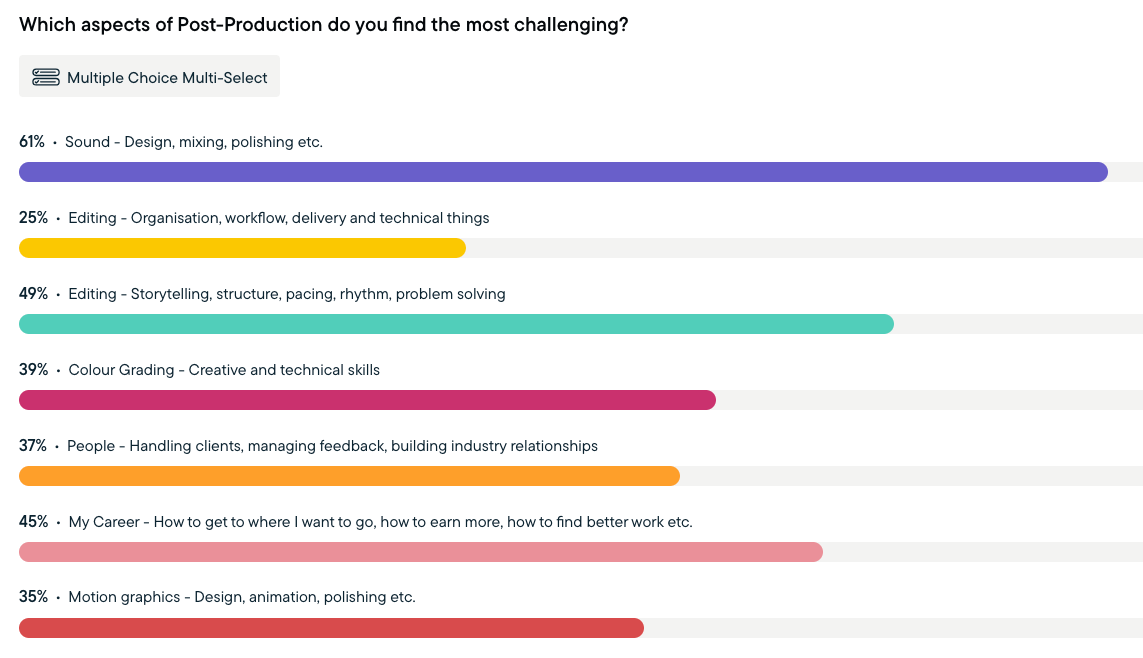
It's no surprise to me that learning better ways to handle sound was the biggest concern for most editors.
Every time I've ever surveyed or spoken to other editors about where they need the most help, they've always said, “I wish I knew what I was doing with sound!”
But the goal of this course isn't to turn you into an audio engineer.
It's to equip you with everything you need to feel confident that you really can deliver a polished final mix.
Honestly, a little targeted knowledge goes a long way, and the gap between a bad mix and polished audio isn't a chasm; it just requires the systematic application of numerous small improvements throughout the process.
Dialogue, Music, Sound Effects, Sound Design, and Mixing are five separate disciplines — each with its own rules, tools, and order of operations.
Most editors treat them as one undifferentiated problem to sort out at the end. That's why, for many editors, audio often remains the weakest part of the edit.
Adding Audio Polish fixes that.
Here's where most editors are when they start:
- Dialogue that's a little rough — and you're hoping nobody notices
- Music is doing the emotional heavy lifting that your edit should be carrying
- Sound effects dropped in as an afterthought
- No reliable system for levels, no idea if you're hitting delivery specs
- Audio is the last thing on the list, and it shows
Here's where you'll be after 5 concise lessons:
- Dialogue that's clean, consistent, and clear — on every project
- Music that enhances the emotion without overpowering it
- Sound effects and design that add genuine production value
- Mixes that pass QC and hold up on every platform
- A permanent audio checklist you'll use from here on
The course breakdown
Introduction (4 min)
The one concept that changes everything: the difference between sound editing and sound mixing — and why the order you do things in matters as much as what you do.
Lesson 1 — Dialogue (9 min)
The foundation of almost every edit. Smooth edits at scale, fill gaps with room tone, apply processing in the right order, and rescue a performance in post when the original isn't good enough.
Lesson 2 — Music (12 min)
A repeatable process for finding better choices, editing them to fit the cut, and mixing them so they serve the story. Because "change the music" is the note you'll keep getting until this clicks.
Lesson 3 — Sound Effects (11 min)
Where to find them, how to design and layer them, and how to blend them so they feel like they belong in the world. Plus a curated list of free and paid libraries.
Lesson 4 — Sound Design (8 min)
The most misunderstood layer — and the one where a single well-placed silence can do more than any plugin. Covers background beds, emotion over realism, and how to hand off your soundtrack professionally.
Lesson 5 — Mixing (9 min)
Walter Murch's 2.5-layer rule. Dialogue-led mixes. LUFS targets for YouTube, Netflix, and broadcast. And an honest take on whether AI mixing tools are worth your time.
Bonus — Audio Checklist (2 min)
A complete checklist for every stage — setup to final QC — plus the Google Doc version to keep as a permanent reference.
$49 | $29 — Limited time launch price
30-day money-back guarantee.
7 emails. One week.
Read in 15 minutes each.
So far, so good

At the end of every lesson, there are one-click feedback buttons to gauge how each section is landing.
So far, the responses have been entirely positive and very encouraging!
While the beta users had super-useful feedback that shaped the course for the better, their peppering of the content with comments like “Great tip!” or “Finally, I get this!” encouraged me to keep improving, reworking, and enhancing the content.
The purpose of email-based training is that:
- a) By landing in your inbox, you'll actually engage with the material
- rather than forgetting to log in to yet another training platform
- b) Drip-feeding the learning over a week makes it manageable to absorb
That said, the final bonus email in the series includes a link to the live Google Doc version of the course, which provides a single reference point for looking something up in the future, and where I will add incremental updates as needed.
Your Adding Audio Polish training series was absolutely terrific!
It spans the knowledge of an entire college-level curriculum in a succinct fashion for working editors.
You really nailed something that needed to be done- creating a concise, repeatable system- for single person producer/editor workflows like mine.
— David. K – Documentary Editor/Producer
This short and succinct series has been my best introduction to audio as an editor who has come from more of an online background, who occasionally needs to fix and sort audio issues.
— James Hawkes, Editor
What's next?
I've put a ton of work into Adding Audio Polish – honestly, far more than I ever thought I would – hence it took a while.
But it's the first one, and I want it to set the standard.
The researching, beta-testing, editing, re-writing, improving, hours of futzing over the look of the emails - each hand-crafted with Claude's help - all took a lot longer than expected.
But that's okay, good things take work.
So I hope you'll take the course.
I really hope it helps you deliver polished and professional-sounding audio across every stage of the process.
And while I hope your colleagues and clients notice the improvement, my main aspiration is that you'll feel confident in Adding Audio Polish to every project.
If you do, I'd really love to know what you think of it!
So remember, adding audio polish is within reach and cut daily.
$49 | $29 — Limited time launch price
30-day money-back guarantee.
7 emails. One week.
Read in 15 minutes each.
PS – As I'm a glutton for punishment, I'm already planning the next one!
Click through to pre-register your interest in using AI in Post-Production and vote for any other topics at the same time.
I'm hopeful it will ship sooner, with a leaner approach, and benefit from all the compounding effort that went into creating Adding Audio Polish.
Save money in Post with Cut/daily!
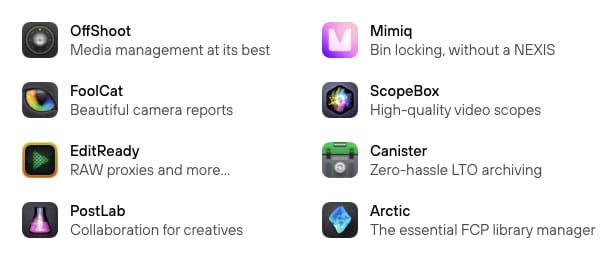
Hedge makes joyful software. I say that because every time I use Offshoot to safely copy files, it literally brings me joy. It's beautifully designed, easy to use and 100% effective.
What more do you want?
PostLab, EditReady, and ScopeBox are also essential items in my Post-Production arsenal. They will serve you well.
Save 10% on any product with the exclusive discount code: "jonnyelwyn"