
#511 – Avid and Apple are changing things

Things are definitely happening.
- Avid changes bin locking in 2026.8
- What does it mean for you?
- Apple announces new M6 Mac Mini and M5 Studio
- Which one should you buy?
- Agentic Editing Gets Closer
- Sorta.
- Two inspiring quotes to ponder
- Ideas change everything
But first...
I heard this question applied to writers the other day and I thought it would make an excellent question for editors too.
Hit Reply and let me know who springs to mind.
Dibs: Joe Walker.
Avid Media Composer 2026.8 – This Changes Things
If you cut in Avid Media Composer I'm sure you're well aware of the rumblings on the grapevine, and now the official confirmation, that Avid is closing the two-decade long window of opportunity to use third-party storage and bin-locking in Avid.
People aren't happy, with most seeing it as a cynical cash grab that will ultimately lose Avid a new generation of users.
What does this mean for me?
- If you're currently using Avid NEXIS storage you're fine.
If you're using third-party storage or bin locking workflow, you can:
- Not upgrade to 2026.8
- Upgrade to the (much more expensive) Avid Media Composer Enterprise tier for a “supported, secure, qualified path for third-party storage use.”
Paul Mattis, CEO of Hedge*, creators of Mimiq - the kind of third-party bin locking emulation Avid is kicking out - wrote a detailed article about the change here:
Except it isn't all third-party storage, is it? Only the qualified kind. So there'll be a list: Avid writes it, Avid changes it, and if what you own isn't on it, you'll be buying new gear on top of the more expensive licenses. They get to decide if and for how long you can do a remote workflow with LucidLink, Suite, or Shade, or never to begin with.
Which is what this really is: a walled garden. Avid decides which storage gets to come in, and the price of Enterprise decides which of you does.
*(And friend of Cut/daily!)
But even so, some details aren't ironed out yet.
Per the official Avid customer FAQ:
I have a Media Composer Perpetual license. What do I do if I need shared projects on third-party storage?
If you are currently a Media Composer Perpetual customer using shared projects on third-party storage, we are working on a path forward for you. For now, we recommend retaining your current version of Media Composer and not updating to 2026.8.
We will provide additional guidance and communicate any required actions once the transition path has been finalised.
If you have an immediate need, moving to Media Composer Enterprise is the best option to take advantage of shared projects and get access to many other tools designed for professional teams.
While at the same time, apparently: “Media Composer Enterprise will be offered as a free-of-charge upgrade for eligible universities and institutions participating in the Avid Learning Partner program.”
But it's not all bad news. Avid Media Composer 2026.8, which is out now also includes:
- Media Composer | First - Previous limits on tracks and resolutions removed to give the full Media Composer experience.
- PhraseFindAI Multicam Auto Cut – automatically cut to whoever is speaking by assigning camera angles to speakers in the transcript.
- ‘Choose Bin Column Search’ – find the right metadata in complex bins.
- ‘Swap Audio Track from Subclip’ – access alternate source audio without rebuilding media selections.
How do you like them Apples?
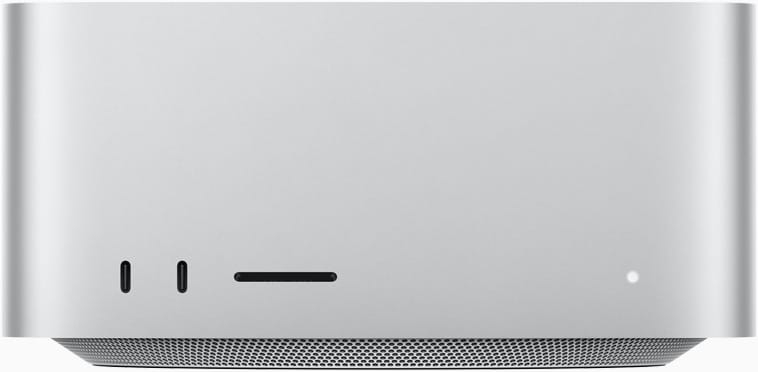
Apple announced the new M6 & M5 Pro Mac Mini and M5 Max & M5 Ultra Mac Studios, which are available for pre-order with delivery times slipping quickly.
I know your first question is - which one should I get?
The $899 base M6 Mac Mini is extremely capable and you could easily edit on this machine (or any intermediate spec you opt for) but essential upgrades like adding a 1TB internal SSD and 32GB RAM takes it to $1799.
But my buying philosophy is buy the best you can and keep it for as long as you can.
Therefore I would aim for an M5 Max or maybe an M5 Ultra Mac Studio.
Upgrade the silicon, RAM and SSD to benefit from:
- More media engines (faster encode/decode)
- Thunderbolt 5 ports
- Local AI/LLM capable machines with higher memory bandwidth
Those same upgrades on the M5 Max Studio (18/40 CPU/GPU) | 64GB RAM | 1TB SSD with 4 x T5 ports and 2x media engines and 614GB/s memory bandwidth take it to $3799 for a monster of a machine that will serve you well for years to come.
This probably what I would/could afford if I were to buy a new machine, which I won't as my M4 Max MacBook Pro is still excellent.
But for an additional $1700 you could bring home an M5 Ultra Studio (30/64 CPU/GPU) | 96GB RAM | 1TB SSD base model with 6x T5 ports and 4x media engines and 1.2TB/s memory bandwidth at $5499.
That would be a whopper and the kind of machine LLM fans are praising for its incredible “value” compared to other AI-focused hardware.
(Christmas is close if you're feeling generous, I'll share my shipping address...)
All the principles still hold. Unless you're planning to go deep into AI?
What's better about the new Macs?
What's new other than better chips? Quite a bit actually.
- Neural Accelerators (Improves AI work on GPU)
- Wifi 7 and Bluetooth 6
- 2.5 Gb Ethernet port
- Genlock over USB-C
- Improved media engines (compared to previous ones)
- Faster internal SSDs (PCI Gen 6 speeds)
- Improved energy efficiency and cooling
AI price hikes – All commentators mention that everything is more expensive thanks to AI sucking up all the chips and memory and driving prices higher.
If you can afford to wait, there's a chance those prices will stabilise or even decline in the future, bringing costs down, maybe.
Take This Further