
#500 - Cut/daily Meets... Cut/daily

Well, well, well. The big 5-0-0.
When I started sending out my daily (then more sensibly, weekly) missives through Cut/daily just over five years ago I never thought we'd be where we are today.
But here we are.
I'm kind of interested to see if we'll make it to 1000?
(Apparently that's likely to be around the end of 2036...)
I'm game, if you are?
A heartfelt thank you to everyone who has stepped up in support of this project in the past few weeks, I've been hugely encouraged by each and every gesture of support from encouraging words to early financial Benefactors.
I'm not going to lie - we did not make it to 200 supporters – not yet, but rather than diminish the ambition, we'll just keep focused on that goal moving forward.
Per my jogging mantra:
It doesn't matter how slow you go, as long as you don't give up.
If you enjoy reading Cut/daily please consider investing less than one hour of your day rate to help keep a year's worth of Post Production Insights free for everyone.
Pennies from Heaven

To celebrate this auspicious occasion I've got a few fun things for you.
- 50% off everything on the Cut/daily store for the next week only!
- Transcriber Translator –
$29= $14.50 - Keyword Marker —
$24= $12 - Teleport –
$15= $7.50
- Transcriber Translator –
- Tidy Media Manager –
$19= $9.50 - Plus Claude Deck and XML Parser are still free/PWYW
New! Free App for Cut/daily Readers – AudioSwap
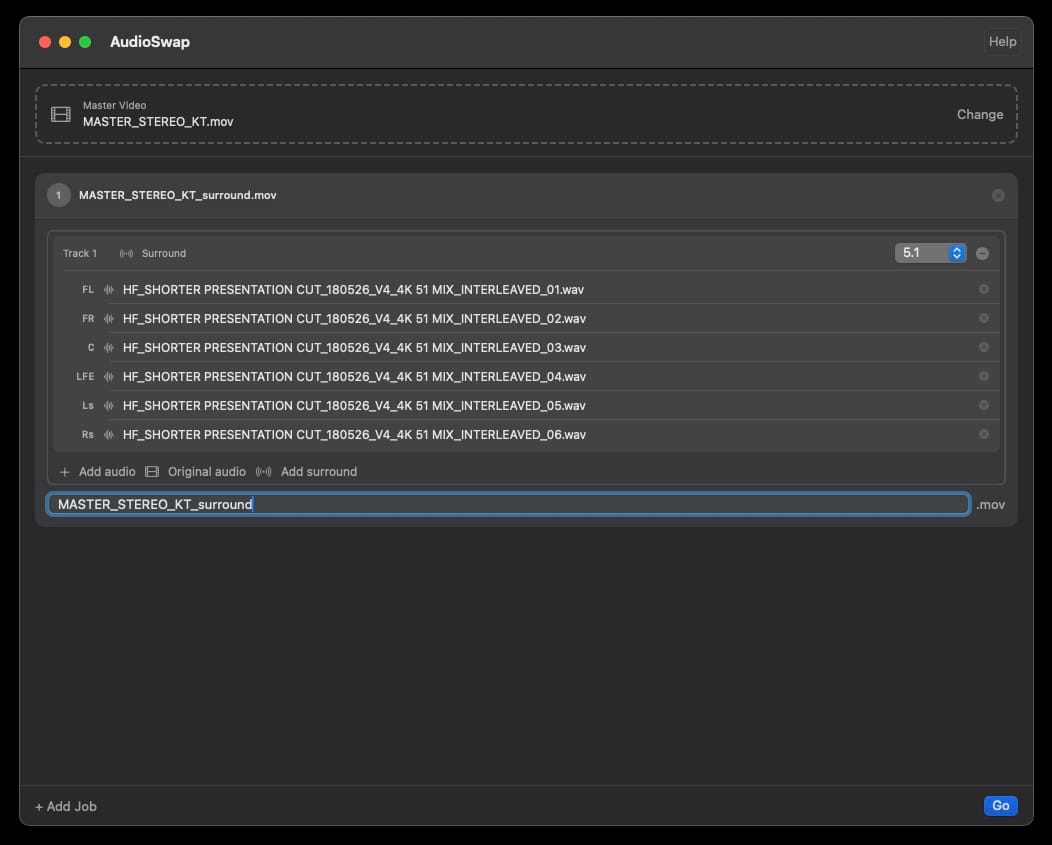
I needed to make some deliverables recently where only the audio changed.
Rather than re-export multiple versions of the same long project, I remembered a neat trick I learned back in the day from another editor (thanks Neil!) where QuickTime Pro would let you strip out the current audio tracks and paste in new ones, updating the video file without needing to re-encode it.
It took seconds instead of the hours it might take for a batch of long exports.
Alas this no longer works in QT and the other apps that come close are a little clunky so, of course, I built my own: AudioSwap.
AudioSwap Features:
- Swap in new audio in multiple formats
- Stereo | 5.1 | 7.1 | mono
- Combine (6x) 5.1 stems into single 5.1 channel
- Keep the original audio
- Re-arrange track layouts
- Batch multiple jobs. Each job creates one file.
- Save time with no re-encoding needed
- Always creates a new file, sources are never touched
How to Swap
- Drag in the video file you want to update.
- Drag in the Audio you want to insert.
- Choose the output setting: Discrete (multichannel) | Stereo | 5.1
- Update the file name
- Hit Go.
Install instructions - AudioSwap is effectively a GUI with ffmpeg doing all the heavy lifting under the hood. Therefore you'll need to have ffmpeg installed to use the app.
This is as simple as copy and pasting two commands into a Terminal session.
#1 – Install Homebrew:
- /bin/bash -c "$(curl -fsSL https://raw.githubusercontent.com/Homebrew/install/HEAD/install.sh)"
#2 – Install ffmpeg:
- brew install ffmpeg
As the app isn't yet signed (as of this week) when you first open AudioSwap you'll need to do one of these steps to bypass Mac OS's Gatekeeper which will likely warn you that “AudioSwap cannot be opened because it is from an unidentified developer.”
- The first time you open AudioSwap: Right-click → Open
- Or run this command in Terminal to whitelist AudioSwap.
- xattr -cr /Applications/AudioSwap.app